
Filing your weekly certification on BEACON is the only way to get paid each week from Maryland unemployment — and you must complete your 3 job search activities in MWE before you can certify. Here’s exactly how to do it in 2026, with deadlines, the 7 questions explained, and the mistakes that delay payments.
⚡ Quick Answer
- You must file a weekly certification in BEACON for every week you want to claim Maryland unemployment.
- The window opens Sunday at 12:01 a.m. and closes Saturday at 11:59 p.m. of the week after the claim week ends.
- Critical rule: complete and log 3 job search activities (including 1 direct job contact) in MWE before certifying. BEACON pulls them automatically.
- 3 ways to certify: online (BEACON), mobile app, or by phone (410-949-0022 / 800-827-4839).
- 2026 max benefit: $430/week for up to 26 weeks, plus a $8/week dependents’ allowance (up to 5 dependents).
- Even if you’re waiting for payment approval, you must keep certifying — back-pay is only released for weeks where a certification is on file.
What the Weekly Certification Is (and Why It Matters)
Filing your initial Maryland unemployment claim is only the first step. To actually receive payments, you must file a weekly certification in BEACON for every week you remain unemployed. The certification is your formal request to be paid for the week that just ended.
By certifying, you’re telling the Maryland Division of Unemployment Insurance four things:
- You were able and available for work each day of the week.
- You completed your 3 job search activities (including 1 direct job contact) and logged them in the Maryland Workforce Exchange (MWE).
- You earned $X in gross income (or zero) for the week.
- Any other facts that affect eligibility (school, training, pension, commission pay).
Skip a week’s certification and that week’s benefit is generally forfeited. The Division of Unemployment Insurance does not retroactively pay weeks where no certification was filed.
🚨 Job Search in MWE Comes BEFORE Certification
This is Maryland’s biggest difference from most other states. You must complete and document at least 3 job search activities (1 must be a direct job contact) in the Maryland Workforce Exchange (MWE) before opening BEACON. BEACON pulls those entries automatically into your certification — if MWE is empty, your certification will fail or be denied. Always do MWE first, BEACON second.
Deadlines: When You Can File
Maryland’s “benefit week” runs Sunday through Saturday. You certify after the week ends — for the week that just closed.
The Filing Window
- Window opens: Sunday at 12:01 a.m. after the claim week ends.
- Window closes: the following Saturday at 11:59 p.m.
- Example (per MD Department of Labor): a benefit week running Sunday May 9 → Saturday May 15 must be certified between Sunday May 16 and Saturday May 21 at 11:59 p.m.
💡 Pro Tip
Certify Sunday or Monday, not Friday or Saturday. BEACON gets congested on Saturday evenings as people rush the deadline, and a session timeout can cost you the week if you can’t log back in before 11:59 p.m. Set a recurring phone reminder for Sunday at 6 p.m.
What If I Miss the Window?
That week’s certification is generally lost. Maryland does not allow late certifications through BEACON. If a system outage or agency error caused you to miss the window, contact a claims agent at (667) 207-6520, Monday–Friday 8 a.m.–4 p.m. — but expect “no” for plain forgetfulness.
3 Ways to Certify
- Online — BEACON portal: the standard method, beacon.labor.maryland.gov.
- Mobile app: the official “MD Unemployment for Claimants” app on iOS and Android.
- Phone (24/7 automated): 410-949-0022 (Baltimore area or out of state) or 800-827-4839 (within Maryland but outside Baltimore). Always write down the confirmation number.
Before You Start: MWE Job Search First
Maryland uniquely requires that your job search be logged in the Maryland Workforce Exchange (MWE) before you certify in BEACON. Skipping this step or doing it after certifying can delay or deny your benefit.
Step-by-Step: Logging Job Searches in MWE
- Go to Maryland Workforce Exchange (mwejobs.maryland.gov).
- Sign in (your MWE account is created automatically when you file your initial claim — same login as BEACON in many cases).
- Open your Job Search Activity Log.
- Add at least 3 activities for the week you’re about to certify, with at least 1 direct job contact (an actual application or contact with an employer who has openings).
- Save / submit each entry. BEACON will auto-pull them when you certify.
What to Have Ready Before BEACON
- Your BEACON username + password.
- 3 work search activities already logged in MWE.
- Any gross earnings from the Sun–Sat week being certified (wages, self-employment, odd jobs, tips, remote work, paid training).
- Records of any commission pay received during the week (different rule — see below).
- If applicable: pension/401(k) effective date or amount changes.
- School / training attended that week.
How to Certify on BEACON — Step-by-Step
Step 1 — Log In to BEACON
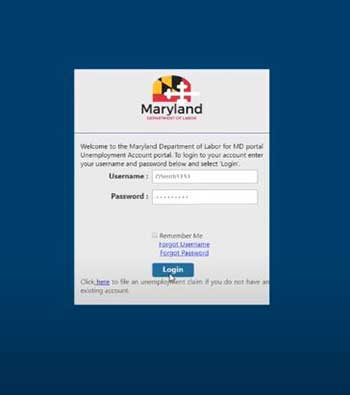
Go to beacon.labor.maryland.gov, enter your username and password, and select Login.
Step 2 — Open the Weekly Certification Tile
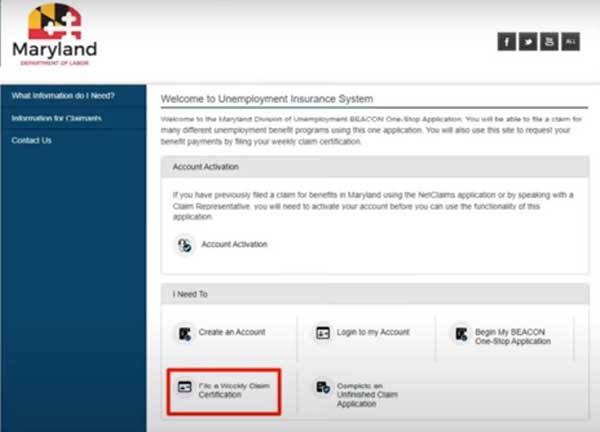
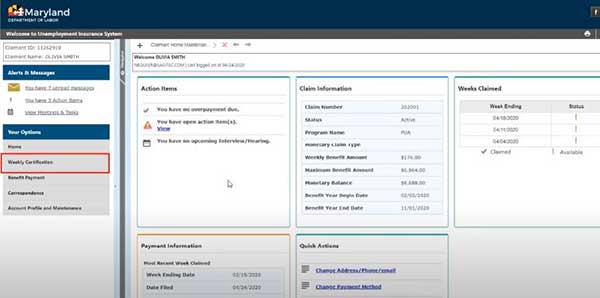
From the BEACON Claimant Portal homepage, click the File a Weekly Claim Certification icon. You can also access it from the menu on the left side of the screen (Weekly Certification) or via an open Action Item on your dashboard.
Step 3 — Review the Weekly Certification Screen
BEACON displays the week available for certification, your claim status, and any pending action items. Confirm the week shown matches the Sunday–Saturday period you’re claiming.

Click Next to proceed.
Step 4 — Read the Guidelines and Disclaimer
BEACON shows the Guidelines for Requesting a Claim Week. This page summarizes eligibility rules and warns about fraud penalties. Read it carefully — knowingly misreporting can result in disqualification, repayment with interest, and potentially criminal prosecution.

Check the disclaimer box and click Next.
Step 5 — Answer the 7 Initial Questions
BEACON asks 7 standardized questions about the past week. You cannot proceed until all 7 are answered. See the next section for a full breakdown of each question.

Click Next when complete.
Step 6 — Verify Your Job Contacts (auto-pulled from MWE)
BEACON displays the job contacts and job search activities you entered in MWE during the benefit week. Verify all 3 (minimum) appear correctly. If you see nothing here, your MWE log is empty — exit, log them in MWE, and come back. Don’t try to certify without entries showing.
If you have a valid job search waiver (DWD-approved training, definite recall date, or DWDAL-approved exemption), you’ll be allowed to continue without job search entries.
Step 7 — Review and Submit
BEACON shows a Review and Submit summary of every answer. This is your last chance to edit. Hit the Edit button on any section that needs correction. Once you submit, you cannot fix mistakes online — you’d have to call a claims agent.

Check the Acknowledgement checkbox certifying every answer is complete and accurate, then click Next to submit.
⚠️ No Edits After Submit
Once submitted, you cannot edit your weekly certification online. If you realize you made a mistake (wrong earnings, wrong work search, wrong answer to “able and available”), contact a claims agent immediately at (667) 207-6520, Monday–Friday 8 a.m.–4 p.m. Correcting honest mistakes promptly is the only way to avoid an overpayment or fraud determination.
Step 8 — Confirmation Page
BEACON displays a Confirmation page with your submission timestamp and a confirmation number. Click Print if you want a hard copy. A PDF is also auto-saved to the Correspondence section of your Claimant Portal.

If your claim is fully approved and there are no holds, payment typically arrives within 2–3 business days via your Bank of America Maryland Unemployment Insurance debit card or your linked direct deposit account.
The 7 Weekly Certification Questions Explained
BEACON asks the same 7 questions every week. Get them wrong and your benefit can be delayed or denied — even unintentionally.
Q1 — Were you able to work each day of the week?
“Able” means no medical or physical condition prevented you from doing your normal work. Answer No if you were sick, hospitalized, or had a condition that prevented work. Answering No can delay or disqualify the week.
Q2 — Were you available for work each day?
“Available” means no personal restrictions kept you from accepting work during your normal hours — childcare, transportation, school, or unavailability all count as restrictions. Lack of childcare or transportation is a common reason claimants accidentally answer “yes” when the correct answer is “no.”
Q3 — Did you attend school or training?
Yes if you attended any school or training (online or in-person) during the week, including programs approved by the Division of Workforce Development and Adult Learning (DWDAL). Unapproved training can affect your eligibility — DWDAL may follow up.
Q4 — Did you actively look for work (3 activities + 1 job contact)?
Yes only if you completed and logged at least 3 job search activities, 1 of which was a direct job contact, in the Maryland Workforce Exchange before certifying. If MWE is empty, answer “no” — but expect the week to be denied.
Q5 — Did you work or earn income?
Yes if you earned anything from any source during the week — wages, part-time work, self-employment, gig work, tips, paid training, remote work, or odd jobs. Report gross income for the week the work was performed, even if you haven’t been paid yet. Exception: commission pay is reported the week you receive it, not the week you earned it.
If your earnings equal or exceed your weekly benefit amount, you are not considered unemployed for that week and won’t receive a payment.
Q6 — Did you receive commission, pension, or retirement pay?
Report any commission payment received during the week (gross). Also report any pension or 401(k) payments from any employer in the last 18 months that you didn’t disclose on your initial claim, plus the effective date and any changes. Do not include Social Security here.
Q7 — Are you interested in low-cost health insurance?
If you say yes, the Maryland Health Connection will contact you about subsidized coverage. Your answer does not affect your unemployment eligibility.
The 3 Job Search Activities Rule
Per the MD Department of Labor, you must complete and document at least 3 valid reemployment activities each week, including at least 1 direct job contact. All 3 must be logged in the Maryland Workforce Exchange before certifying.
What Counts as a Direct Job Contact
- Submitting a job application (online, in person, by mail, or through MWE).
- Interviewing for a job (in person, by phone, or video).
- Contacting an employer who may have openings.
- Following through on a referral from a Workforce Center.
Other Valid Reemployment Activities
- Attending a job fair or networking event.
- Meeting with a Workforce Specialist at an American Job Center.
- Completing a career-related workshop or assessment.
- Creating or updating a resume or cover letter.
- Posting a resume on MWE or another professional networking site.
- Searching for jobs in MWE (registering as a job seeker counts).
- Participating in a Reemployment Services and Eligibility Assessment (RESEA) appointment.
🔑 What to Record for Each Activity
- Date of the activity.
- Employer name or organization (or website / event name).
- Position / job title.
- Method of contact (online, email, phone, in person).
- Outcome / result.
- Save confirmation emails / screenshots — Maryland Department of Labor can audit at any time.
Job Search Waivers
You’re exempt from the 3-activity requirement if any of these apply:
- You’re enrolled in DWDAL-approved training.
- You’re a job-attached worker with a definite recall date within 10 weeks of separation.
- You’re a member in good standing of an approved union hiring hall.
Mistakes That Stop Your Payment
- Certifying before logging job search in MWE — your certification will fail or be denied. MWE first, BEACON second.
- Logging only 2 activities or 0 direct job contacts — Maryland requires 3 activities plus at least 1 direct job contact.
- Reporting net earnings instead of gross — triggers an overpayment when employer wage data is matched.
- Reporting wages by paycheck date instead of week worked — same overpayment risk. Exception: commission pay reports by date received.
- Forgetting to report tips, gig work, or remote side income — all count and all must be reported gross.
- Missing the Saturday 11:59 p.m. deadline — the week is forfeited.
- Stopping certifications during a pending appeal or hold — back-pay only releases for weeks with a certification on file.
- Answering “yes” to able-and-available when childcare or transportation prevented work — this is a fraud-flagged answer if employer or DOL records contradict.
- Not writing down the phone confirmation number when certifying via 410-949-0022 or 800-827-4839 — without it you have no proof.
- Not closing the claim when you return to full-time work — keep a final partial-week certification if your first week back has earnings below your WBA.
Frequently Asked Questions
What time does the Maryland weekly certification have to be filed by?
By Saturday at 11:59 p.m. of the week following the claim week. Example: a benefit week running Sunday May 9 – Saturday May 15 must be certified between Sunday May 16 (12:01 a.m.) and Saturday May 21 (11:59 p.m.). Best practice is to certify Sunday or Monday.
Do I have to log my job searches before certifying in BEACON?
Yes. Maryland requires that you complete and document your 3 job search activities (including 1 direct job contact) in the Maryland Workforce Exchange (MWE) before filing your weekly certification in BEACON. BEACON pulls your MWE entries automatically into your certification. If MWE is empty, your certification will fail or be denied.
How many job search activities does Maryland require each week?
At least 3 valid reemployment activities, with at least 1 direct job contact (an actual application, interview, or employer contact). Activities must be logged in MWE. Waivers exist for DWDAL-approved training, job-attached workers with a definite recall within 10 weeks, and approved union hiring hall members.
What is the maximum Maryland unemployment benefit in 2026?
The maximum weekly benefit amount is $430/week (range: $50–$430), plus a $8/week dependents’ allowance for up to 5 dependents (max $40/week extra). Only one parent can claim a dependent within a 12-month period. Dependents’ allowance is paid for up to 26 weeks per benefit year.
How long can I get Maryland unemployment?
Up to 26 weeks of regular state unemployment within a 52-week benefit year. Maryland does not currently have any state or federal extension programs active in 2026.
What if I miss the certification deadline?
That week’s payment is generally forfeited. BEACON does not accept late certifications. In limited cases (system outage, agency error, documented medical emergency) you can call a claims agent at (667) 207-6520 Monday–Friday 8 a.m.–4 p.m., but late certifications are rarely granted.
Can I file my Maryland weekly certification by phone?
Yes. Maryland operates a 24/7 automated telecert line: 410-949-0022 (Baltimore area or out of state) or 800-827-4839 (within Maryland but outside Baltimore). Always write down the confirmation number — without it you have no proof of filing.
Is there a Maryland unemployment mobile app?
Yes. The official “MD Unemployment for Claimants” app is available on iOS and Android. You can use it to file weekly certifications, check claim status, and view correspondence. Same login as the BEACON web portal.
How do I report commission pay on my certification?
Commission pay is the one exception to Maryland’s “report by week worked” rule — you report commission pay the week you receive it, not the week you earned it. Report the gross amount before taxes or deductions, on Question 6 of the certification.
What happens if I underreport my earnings?
The Division of Unemployment Insurance cross-matches your answers against employer wage reports. Discrepancies trigger an overpayment determination, may include a fraud penalty (additional fees and interest), and can result in disqualification or criminal prosecution. Always report gross earnings for the week the work was performed.
Do I keep certifying while waiting for payment approval?
Yes. The MD Department of Labor explicitly tells claimants: while waiting for payment, you still need to complete weekly job search and certifications. If approved later, back-pay is only released for weeks where a certification is on file.
How long does it take to get paid after certifying in Maryland?
If your claim has no holds, payment typically arrives within 2–3 business days via the Bank of America Maryland Unemployment Insurance debit card or your linked direct deposit. The first eligible payment after a new claim takes longer due to monetary determination processing.
Are Maryland unemployment benefits taxable?
Yes — federally and at the Maryland state level. You can elect 10% federal and a Maryland state withholding when you file your initial claim, or pay quarterly estimated taxes. The Division of Unemployment Insurance issues a 1099-G in January for the prior year’s total.
Key Takeaways
- File weekly in BEACON for every week you claim — even before payment is approved.
- Window: Sunday 12:01 a.m. through Saturday 11:59 p.m. of the week after the claim week.
- Log 3 job searches (with 1 direct job contact) in MWE BEFORE certifying. BEACON auto-pulls them.
- 2026 max WBA: $430/week + $8/dependent (up to 5) for up to 26 weeks.
- 3 ways to certify: BEACON web, “MD Unemployment for Claimants” mobile app, or phone 410-949-0022 / 800-827-4839.
- Report income for the week worked, gross. Exception: commission pay = week received.
- No edits after submit. Mistakes? Call (667) 207-6520 immediately.
- Keep MWE entries and confirmation numbers — random audits happen.
- Keep certifying during a pending appeal or hold; back-pay only releases for filed weeks.
Need help with another step in your Maryland claim?
Browse all our Maryland unemployment guides — filing claims, BEACON portal walkthroughs, weekly certifications, action items, and more.
The Unemployment is an independent informational resource. We are not affiliated with the Maryland Department of Labor or any government agency. Always verify benefit details directly at labor.maryland.gov/unemployment-insurance.
Official Sources
- MD Department of Labor — Completing Your Weekly Certification
- MD Department of Labor — Knowing Your Job Search Requirements
- MD Department of Labor — How to Apply for and Collect Benefits
- BEACON Claimant Portal
- Maryland Workforce Exchange (MWE)
- List of Maryland’s Valid Reemployment Activities (PDF)
- A Guide to Reemployment — Unemployment Insurance in Maryland (PDF)