Filing your weekly voucher on Uplink is the only way to get paid each week from Indiana unemployment — miss it, and that week’s benefit is gone. Here’s exactly how to file your Indiana weekly claim voucher in 2026, with deadlines, work search rules, and the mistakes that stop payments.
⚡ Quick Answer
- You must file a weekly voucher on Uplink CSS for every week you want to claim Indiana unemployment.
- The voucher window opens Sunday at 12:00 a.m. ET and closes Saturday at 8:59 p.m. ET. Don’t try Saturday 9:00 p.m.–11:59 p.m. — system maintenance.
- Required: complete at least 2 work search activities per week (unless waived) and keep written records for 6 months.
- 2026 max benefit: $390/week for up to 26 weeks (set by Indiana law).
- The first week you claim is the waiting period week — no payment, but you still must file the voucher.
- Even if you have a pending appeal, you must keep filing weekly vouchers.
What the Weekly Voucher Is (and Why It Matters)
Filing your initial Indiana unemployment claim is only the first step. To actually receive payments, you must file a weekly voucher through Uplink CSS for every week you remain unemployed. The voucher is how you tell the Indiana Department of Workforce Development (DWD) four things about the prior week:
- That you were able and available to work full-time.
- That you completed your 2 required work search activities (unless waived).
- That you earned $X in income (or zero) — including wages, self-employment, severance, vacation pay, and similar.
- Any other relevant facts (job offers, union hall status, pension/401(k) payments, disability/Social Security).
If you skip a week’s voucher or miss the Saturday 8:59 p.m. ET deadline, that week’s benefit is forfeited — DWD will not retroactively pay it.
🚨 Pending Appeal? Keep Filing Vouchers.
If your benefits are on hold or you have a pending appeal, you still must submit a voucher every week. If you later win the appeal, you’ll only be paid for weeks where a timely voucher is on file. Stopping vouchers = losing those weeks permanently, even if you win.
Deadlines: When You Can File
Indiana’s “voucher week” runs Sunday through Saturday. You file after the week ends — for the week that just closed.
The Filing Window
- Window opens: Sunday at 12:00 a.m. ET, after the prior week ends.
- Window closes: the following Saturday at 8:59 p.m. ET.
- Maintenance blackout: Uplink does not accept weekly vouchers between 9:00 p.m. and 11:59 p.m. ET on Saturday. The Uplink homepage stays available 24/7, but the voucher form is closed during that 3-hour window.
- The voucher session has a countdown timer at the top — give yourself 15–20 uninterrupted minutes.
💡 Pro Tip
File Sunday or Monday, not Saturday night. The Saturday 9 p.m. cutoff catches a lot of claimants by surprise — they sit down to file at 8:55 p.m., the system kicks them out mid-form, and the week is lost. Set a phone reminder for Sunday at 6 p.m.
What If I Miss the Window?
That week’s voucher is generally lost. DWD does not allow late voucher filings through the website. In rare cases (system outage, agency error, documented hospitalization) you may call (800) 891-6499 — but expect the answer to be no for plain forgetfulness.
When Will Payment Arrive?
If your claim has no issues, payment typically posts within 2–3 business days of submitting your voucher. Direct deposit lands earlier than the KeyBank ReliaCard. The first eligible payment after a new claim takes longer because DWD must complete the monetary determination first.
Before You Start: What to Have Ready
Have these on hand before you log in:
- Your Uplink CSS username + password.
- Your 2 work search activity records for the week (employer name, date, position, contact method, outcome).
- Any pay stubs or earnings records for the Sun–Sat week being claimed — gross amount.
- Reasons for separation if you worked any new employer that week.
- Any job offer details if you received and declined or accepted an offer.
- If applicable: union hall membership status, pension/401(k) draws, severance, vacation, holiday pay, disability or Social Security amounts.
How to File on Uplink — Step-by-Step
Step 1 — Log In and Click “File Voucher”
Go to Uplink Claimant Self Service (CSS) and sign in. From your dashboard, click File Voucher.

Step 2 — Select the Week to File
Select the radio button for the week you want to file, then click Continue. Make sure the dates match the week you’re claiming — every question on the voucher refers to that specific Sunday–Saturday window.
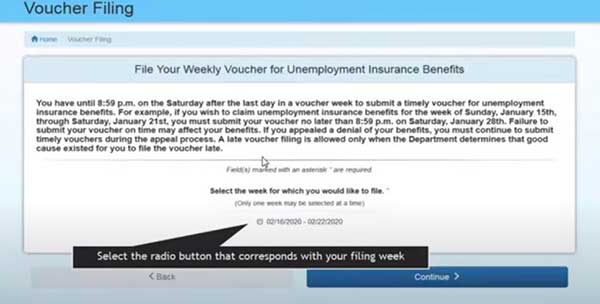
Step 3 — Read the Progress Bar
The top of every voucher page has two key elements: a countdown timer (how long you have to finish) and a progress bar showing the modules you’ll complete: Introduction → Employment History → Income → Ability to Work → Miscellaneous → Verify/Submit.

Confirm whether you want to file for benefits for the week shown. Yes → continue. No → no payment for that week.

Step 4 — Employment History
Uplink shows employers that have reported wages under your SSN. Review the list. If you worked for an employer not listed, you’ll add them later.

Answer the dates question accurately and click Continue.
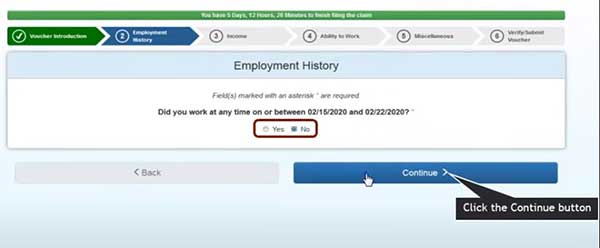
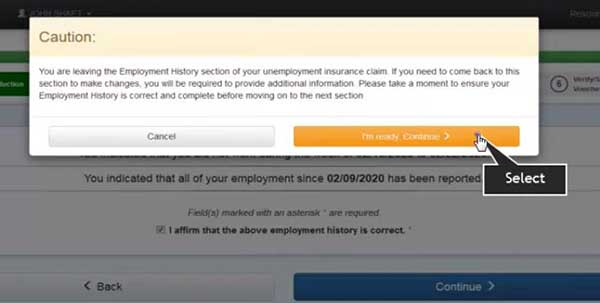
Review your full employment timeline for accuracy. Affirm and continue.

The summary screen requires you to affirm employment is correctly reported. You can’t move forward until you do.
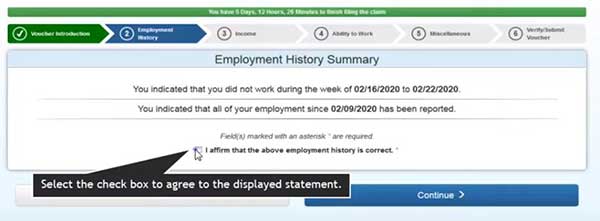
You’ll get a final warning: if you affirm now and need changes later, you’ll have to re-do the section. Click I’m ready. Continue.
Step 5 — Income (All Sources)
You must report all money earned or received for the week, including:
- Wages (gross, for the week worked — not the week paid).
- Self-employment income.
- Vacation, holiday, severance, sub pay, strike pay.
- Pension, 401(k), retirement plan distributions.
- Disability or Social Security payments not previously reported.

⚠️ Underreporting = Fraud Investigation + Overpayment
DWD cross-matches your voucher answers against employer wage reports, IRS data, and Social Security records. Underreporting income — even by accident — triggers a fraud investigation and an overpayment determination. Penalties can include 25% additional fees, criminal prosecution, and benefit disqualification. When in doubt, report it.

Self-employment compensation — required to report, even gig economy work.
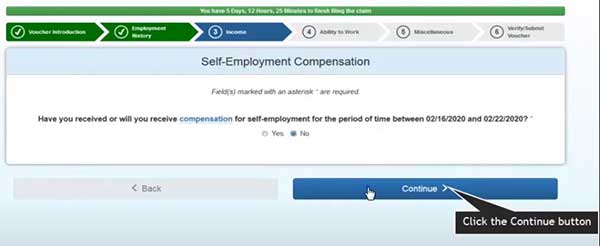
Other income — anything not from a listed employer.

Strike or sub pay:

Government assistance (disability, SS) not previously reported:

Pension / 401(k) / Retirement:
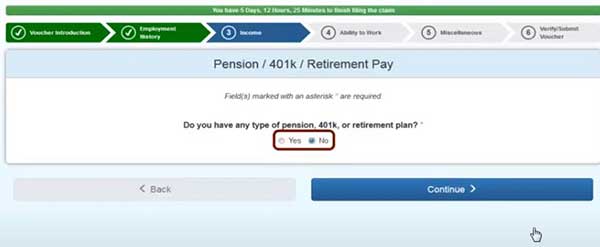
Review every income answer. Edit anything wrong before continuing.


Step 6 — Ability to Work
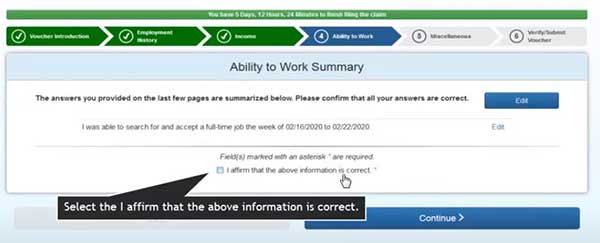
To get paid, Indiana requires you to be able and available for full-time work. This module asks whether anything during the week limited that.

Check every statement that applies (school, illness, travel, transportation problems, etc.) — or “none of the above” if you were fully able and available. Answer truthfully; checking the wrong box can pause your benefits.

Confirm and continue.
Step 7 — Miscellaneous (Union Hall, Job Offers, Work Search)
Union hiring hall — answer Yes if you’re a member of a DWD-authorized hall. Update union dues paid date if it changed.

Offer of work — Yes if you received any offer during the voucher week. Refusing “suitable work” can disqualify you.

Work search — confirm you completed at least 2 work search activities for the week (or have a valid waiver). Keep your written log; DWD can audit at any time.

Step 8 — Verify and Submit
Benefits Rights Agreement — read the fraud notice carefully. Type your initials, check I agree, and continue.

Claimant Information Summary — your last chance to edit. Review every section.

Type your full name in the signature box, then click I affirm. Submit my voucher.

You’ll see a confirmation screen. Click Claimant Homepage to return to your dashboard.

Log off when you’re done — especially on shared computers.

If there are no issues on your claim, payments typically arrive within 2–3 business days via direct deposit or your KeyBank ReliaCard.
The 2 Work Search Activities Explained
Per DWD’s official Work Search policy, you must complete at least 2 qualifying work search activities each week (unless waived). Eligible activities fall into four categories:
Job Preparedness & Networking
- Create or update a resume / cover letter.
- Create or update a LinkedIn profile or other professional networking account.
- Attend a job fair or networking event.
Employer Contact
- Submit a job application for an employer with current or expected openings.
- Follow through on a job referral from DWD or WorkOne.
- Make in-person or remote contact with employers who have or may have openings.
- Interview for a job.
- Job shadowing.
WorkOne Activities
- Attend WorkOne (RESEA) orientation, initial interview, or follow-up.
- Create a Re-Employment Plan at WorkOne.
- Complete a WorkOne workshop or assessment (TABE, Accuplacer, WorkKeys).
- Apply for or participate in employment and training services through WorkOne partner programs.
Online Activities
- Upload your resume to or register at Indiana Career Connect.
- Click on Pivot, Indiana’s Workforce Engine, in CSS.
- Search for jobs online (Indiana Career Connect, Indeed, LinkedIn, Monster, etc.).
- Complete a Career Related Assessment (Indiana Career Connect, Indiana Career Explorer).
- Discover Labor Market information.
- Complete an online workshop.
🔑 What to Record for Each Activity
- Date of the activity.
- Employer name or website name.
- Position / job title.
- Method of contact (online application, email, in-person, phone).
- Outcome (applied, interview scheduled, no response, etc.).
- Save confirmation emails / screenshots for 6 months — DWD can audit at any time during your claim.
Work Search Waivers
You don’t have to complete the 2 activities if any of these apply:
- You’re enrolled in DWD-approved training.
- You’re a job-attached worker with a definite recall date within 60 days of separation.
- You’re a member in good standing of a DWD-authorized union hiring hall.
RESEA — Re-Employment Services
If selected for the Re-Employment Services and Eligibility Assessment (RESEA) program, you’ll be required to appear in person at your local WorkOne Career Center and show previous weeks’ work search logs. Full participation in RESEA is mandatory to continue receiving benefits. Missing a scheduled RESEA appointment can stop your payments immediately.
Reporting Income Correctly
This is the single biggest cause of overpayments and fraud holds in Indiana unemployment.
The “Earned vs Paid” Rule
Report gross earnings for the week the work was performed, not the week you got paid. Example: you work 8 hours on Wednesday, paycheck arrives 2 weeks later. Those earnings go on the voucher for the week you worked, regardless of payday.
What Counts as Income
- Wages from any employer (gross).
- Self-employment income (gig work, freelancing, contractor pay).
- Severance, vacation, holiday pay.
- Sub pay or strike pay.
- Pension, 401(k) distributions, retirement plan payments.
- Disability or Social Security (only if not previously reported).
The 20% Earnings Disregard (Side Income Rule)
If you earn money from an employer NOT listed on your Monetary Determination of Eligibility (e.g., a new part-time job, gig work, side income), Indiana applies a 20% disregard: earnings up to 20% of your weekly benefit amount (WBA) don’t reduce your check. Earnings above that threshold are subtracted dollar-for-dollar.
Example: if your WBA is $300, the first $60 of side-income earnings is disregarded. Earn $100 from a gig, only $40 reduces your benefit ($300 − $40 = $260 paid that week).
Wages from a base-period employer (one already listed on your Monetary Determination) are typically deducted dollar-for-dollar from week one — no 20% disregard. Always report gross, regardless.
📝 Always Report — Even Small Amounts
If you earned $20 mowing a lawn or $40 from a gig app, report it. DWD’s wage cross-match program flags discrepancies automatically. Reporting honestly protects you from fraud penalties even if it costs you a few dollars on that week’s check.
Mistakes That Stop Your Payment
- Missing the Saturday 8:59 p.m. ET deadline — that week’s voucher is gone.
- Filing before the week ends — Uplink only accepts vouchers for completed weeks.
- Reporting net wages instead of gross — triggers a wage cross-match overpayment.
- Reporting wages by paycheck date instead of week worked — same issue.
- Skipping the waiting period week voucher — yes, it’s unpaid, but you still must file it for the rest of your claim to function.
- Stopping vouchers during a pending appeal — you can only be paid back-weeks where a voucher is on file.
- Reporting fewer than 2 work search activities — week denied unless waived.
- Not keeping work search records for 6 months — random audits will request proof.
- Refusing a job offer without reporting it — disqualification when employer reports.
- Forgetting to report severance or vacation pay — common mistake right after layoff. It must be reported.
- Letting the voucher session time out — the countdown is real. Don’t multitask through it.
- Missing a RESEA appointment — stops payments immediately, even if vouchers are filed correctly.
Frequently Asked Questions
What time does the Indiana weekly voucher have to be filed by?
By Saturday at 8:59 p.m. Eastern Time. Uplink does not accept weekly vouchers between 9:00 p.m. and 11:59 p.m. ET on Saturday — that’s a system maintenance blackout. Best practice: file Sunday or Monday.
What if I forgot to file my Indiana voucher last week?
That week’s payment is generally forfeited. Uplink does not accept late vouchers through the website. In rare cases (system outage, hospitalization, agency error) you can call DWD at (800) 891-6499, but backdated vouchers are rarely granted.
How many work searches do I need each week in Indiana?
At least 2 qualifying work search activities per week, unless you have a waiver (DWD-approved training, job-attached worker with recall in 60 days, or DWD-authorized union hiring hall membership). Keep written records and confirmation emails for 6 months — DWD audits routinely.
What is the maximum Indiana unemployment benefit in 2026?
$390 per week, set by Indiana law. Your actual weekly benefit amount depends on your earnings during the base period. The maximum total benefit is generally WBA × 26 weeks. SB 116 (introduced in 2025) proposed raising the cap to $445 plus $50 per dependent, but did not pass.
How long can I get Indiana unemployment?
Up to 26 weeks of regular state unemployment within a 52-week benefit year. Indiana does not currently have any state or federal extension programs active.
Why didn’t I get paid for my first voucher?
Indiana law requires a one-week waiting period. Your first voucher is unpaid by design — but you still must file it for the rest of your claim to process correctly.
Do I have to file a voucher if my appeal is pending?
Yes. If you don’t file weekly vouchers during a pending appeal and you later win, DWD can only pay you for weeks with a voucher on file. Stopping vouchers during an appeal is the costliest mistake you can make.
How long does it take to get paid after filing a voucher?
If your claim has no issues, payment typically arrives within 2–3 business days via direct deposit or your KeyBank ReliaCard. The first eligible payment after a new claim takes longer because DWD must complete the monetary determination first.
What time does Indiana unemployment pay each week?
There’s no fixed payday time — once your voucher is approved and processed (typically 2–3 business days after submission), direct deposit hits overnight at most banks, and the KeyBank ReliaCard updates within 24 hours of processing.
Can I file my Indiana voucher from my phone?
Yes. Uplink CSS works on mobile browsers, but the form is long (typically 6 modules with multiple screens each) and the session has a countdown timer. Use Wi-Fi and don’t switch apps mid-form — interruptions can time you out.
How do I file Indiana unemployment online?
All Indiana unemployment filings — initial claims, weekly vouchers, appeals, and updates — happen through Uplink Claimant Self Service (CSS). You’ll create an account, file your initial claim, then file a voucher every week between Sunday and Saturday 8:59 p.m. ET.
What happens if I underreport my earnings on a voucher?
DWD cross-matches voucher answers against employer wage reports. Discrepancies trigger an overpayment determination plus potential fraud penalty (25% additional) and disqualification. Always report gross wages for the week you worked, even if your check hasn’t arrived yet.
Can I appeal if my Indiana unemployment is denied?
Yes. File your appeal within 15 days from the date your “Determination of Eligibility” was issued (not the date you received it). You can mail your appeal to DWD at 10 North Senate Avenue, Indianapolis, IN 46204, or submit through Uplink CSS. See our Indiana unemployment appeals guide for the full process.
Are Indiana unemployment benefits taxable?
Yes — federally and at the Indiana state level. You can elect 10% federal and Indiana state withholding when you file your initial claim, or pay quarterly estimated taxes. DWD issues a 1099-G in January for the prior year’s total.
Key Takeaways
- File a weekly voucher on Uplink CSS for every week you claim.
- Window: Sunday 12:00 a.m. through Saturday 8:59 p.m. ET. No vouchers Sat 9:00–11:59 p.m. (maintenance).
- Required: 2 work search activities per week (unless waived) + accurate gross income reporting.
- 2026 max WBA: $390/week; up to 26 weeks in a 52-week benefit year.
- First voucher = waiting period week: file it but no payment.
- Report income for the week worked, not the week paid. Always gross.
- 20% earnings disregard applies only to non-base-period employer wages.
- During a pending appeal, keep filing vouchers — that’s how you preserve back-pay rights.
- Keep work search records (and confirmation emails) for 6 months. Audits happen.
- Appeal deadline: 15 days from your Determination of Eligibility date.
- Missed a week? Call (800) 891-6499 — but assume it’s lost.
Need help with another step in your Indiana claim?
Browse all our Indiana unemployment guides — filing claims, vouchers, work searches, appeals, and more.
The Unemployment is an independent informational resource. We are not affiliated with DWD or any government agency. Always verify benefit details directly at in.gov/dwd/indiana-unemployment.
Official Sources
- DWD — File for Unemployment (Vouchers)
- Uplink Claimant Self Service (CSS) Logon
- DWD — Work Search Requirements
- DWD — Unemployment Insurance FAQ ($390 max confirmed)
- DWD — File an Appeal (15-day deadline)
- DWD — Indiana Unemployment FAQs (PDF)
- DWD — UI Eligibility Guide (PDF)
- CBPP — How Many Weeks of Unemployment Compensation Are Available